


Yi Home
2.733.34K Reviews
App Specs
- Version
- 6.9.8_20260826105838
- Updated On
- License
- Free
- Downloads
- 5,000,000+
- Developer
- Kami HK
- Categories
- Lifestyle
- Platform
- Android, iOS
Screenshots
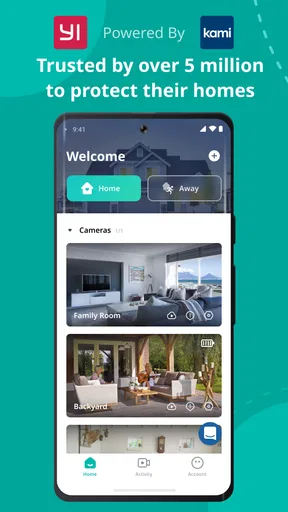
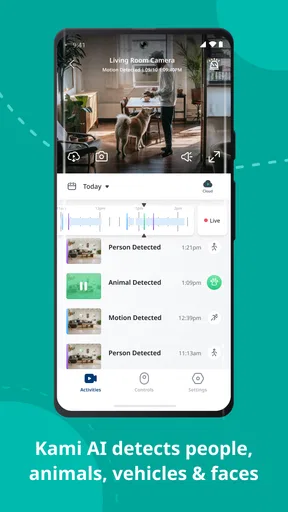
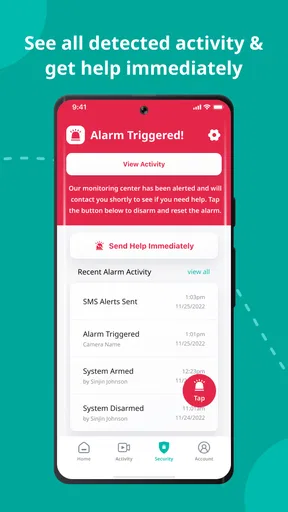

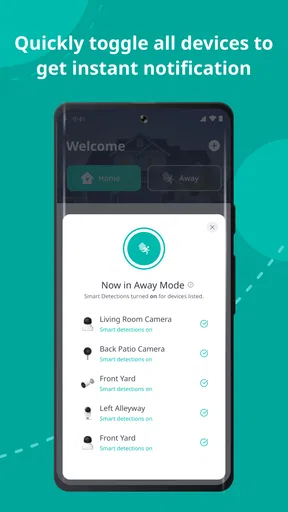
 Analysis by AppCompare
I judge a home-monitoring app differently from an ordinary lifestyle tool: it may sit between a person and a private room, so convenience is only part of the decision. Yi Home is made by Kami HK and is intended for people who use Yi connected devices. Its appeal is having those devices gathered in one place, but I would not treat a camera app as a substitute for thinking carefully about who can view a camera and when it should be active.
What trust looks like in day-to-day use
The practical trust question is not whether an app sounds reassuring; it is whether its controls fit your habits. I would decide where a camera belongs before pairing it, then consider who in the household needs access and how often anyone will check the feed. A view of a shared entrance is a different choice from a view of a bedroom or a space where guests may expect privacy.
I also recommend treating notifications as prompts to verify, not proof of a security event. A motion alert can be useful, but it still asks you to open the app and assess what is happening. That distinction matters if you are away from home and hoping a phone notification alone will resolve a problem.
Getting Started with Yi Home
First off, setting up the Yi Home app is a breeze. I mean, who wants to wrestle with a complicated setup when you're just trying to keep your home secure, right? The app is available for both iOS and Android, so you’re covered no matter what kind of phone you have. I downloaded it from the App Store, and within minutes, I was ready to go.
Once you’ve installed the app, it walks you through pairing your camera. The instructions are straightforward, and I didn’t encounter any hiccups. Just make sure your camera and phone are on the same Wi-Fi network, and you’re golden. Trust me, if I can do it, anyone can!
Features That Stand Out
Let’s talk features. The app packs quite a punch for something you can download for free. First up is the live streaming. You can check in on your home anytime, anywhere. The video quality is surprisingly good — crisp and clear, even at night, thanks to its night vision capabilities.
The app also offers motion detection. Now, this is where things get interesting. You can customize the sensitivity, which means you won’t get bombarded with notifications every time a leaf blows past your window. I found this feature super handy for keeping tabs on actual movement without the false alarms.
Worth Reading Before You Choose

EA SPORTS FC Mobile 26 Is a Bigger Football Game, but It Takes Time

Flipboard Shows What News Apps Must Do Beyond the Feed

Switching to Android Auto Means Rethinking Your Driving Routine

Google Calendar Makes a Crowded Week Easier to Manage

Ludo King Makes the Most of the Minutes Between Plans

Baby Panda World Brings Quick Play to Modern Phones, but Its Game Library Feels Busy
Another neat feature is the two-way audio. Ever wanted to talk to your pet while you’re at work? Or maybe shout at an intruder to scare them off? You can do both with this app. The audio quality is decent, though there’s a slight delay, but it’s nothing too bothersome.
Making the controls work for your routine
One useful way to approach motion sensitivity is to start conservatively and adjust after seeing what triggers alerts in your own space. A camera facing a busy window may need a different setting from one watching a quiet hallway. Changing sensitivity is more useful when you make one adjustment at a time and observe the result, rather than trying to eliminate every alert immediately and risking missed movement.
For a household with pets, two-way audio can be a quick way to check in, but I would not rely on it as a dependable substitute for being physically present. A short delay is manageable for a greeting or a simple call, while a real conversation can feel awkward if both sides speak at once. Before using the speaker to address someone, it is also worth checking that the camera is pointed at an appropriate shared area.
Real-World Use
So, how does it hold up in day-to-day use? Pretty well, actually. I’ve had it running for a few weeks now, and it’s been reliable. The app sends notifications promptly, and I haven’t experienced any crashes or bugs. The interface is user-friendly, which is always a plus in my book.
One thing I noticed is that the app can be a bit of a battery hog if you’re streaming video for long periods. But honestly, that’s to be expected with any live streaming service. Just something to keep in mind if you’re planning to use it extensively.
Speaking of streaming, I tested the app over both Wi-Fi and mobile data. It performs well on both, though obviously, Wi-Fi offers a smoother experience. If you’re on a limited data plan, you might want to be cautious about how much you’re streaming.
A realistic check-in, and the trade-offs
Picture leaving home for the day and wanting to check whether a delivery has been left near the entrance. A quick live view is a more deliberate check than waiting for an alert: you open the app, look at the relevant camera, and close the stream once you have the answer. That keeps the app useful without turning it into something you feel compelled to watch continuously.
For a different routine, such as checking on a pet during a lunch break, the motion alert can help you decide whether opening the live feed is worthwhile. The trade-off is that frequent alerts and repeated viewing can make the app feel noisy and use more phone battery or mobile data. I would use it for specific checks, not keep the stream open in the background.
Compared with a camera’s own controls or a general smart-home dashboard, this app’s main advantage is its focus on Yi devices in one place. If your household mainly uses those products, a dedicated companion app is a straightforward choice. If you want one interface for equipment from several brands, a broader home-control option may suit you better, provided it supports the devices you own. I would check compatibility before choosing a platform rather than assume that every camera can be managed from every app.
Privacy choices and practical limits
When a camera is in a sensitive space, I would decide whether live viewing is genuinely needed there before setting it up. A camera aimed toward an entrance or another shared area can serve a clear purpose; a camera pointed at a place where household members expect privacy deserves more thought. I would also explain its use to anyone who lives in or regularly visits the home. Those are practical choices a device app cannot make for you.
I would not infer a particular privacy policy, permission list, or account-security option from the app’s general purpose. Instead, I would read the permission prompts shown during installation, review the account and access choices presented inside the app, and grant only what makes sense for the way I plan to use it. If a requested permission does not seem relevant, I would pause and understand the prompt before continuing rather than approving it automatically.
Another useful habit is to keep a clear boundary between checking a feed and responding to an emergency. A phone app depends on your phone, connection, and attention; it is not a guarantee that you will see every event in time. If reliable protection is the priority, I would compare a camera app with the wider security setup you need instead of treating a live view as a complete alarm system.
Who is likely to get the most from it?
This is a sensible fit for someone who already has Yi connected devices and wants a familiar place to check them, especially for occasional home or pet check-ins. It is also approachable for a first-time camera owner who prefers a guided pairing process and everyday controls such as live viewing, sensitivity adjustment, and two-way audio.
I would hesitate if your priority is a single dashboard for a mixed collection of smart-home brands, if you are uncomfortable placing a connected camera in your home, or if you need monitoring that works without depending on a phone and network connection. The app is free to download, but in-app purchases range from $3.99 to $184.99 per item, so I would check what any optional purchase offers and whether it matches my needs before paying.
It is a lifestyle app rated for Everyone, and it has an average rating of 2.8 from around 363,000 ratings, with roughly 32,000 written reviews. Those figures are a reason to read recent user feedback for issues that resemble your own setup, not a verdict on how it will behave with your particular device and network. It has passed 5 million installs and first appeared on November 10, 2015; its current version is 6.8.5_20260115054026, and it requires Android 7.0 or later.
Final Thoughts
All in all, I’ve been pretty impressed with the app. It’s packed with features that are genuinely useful, not just flashy add-ons. The setup is simple, the interface is intuitive, and the features work as advertised. Whether you’re a tech whiz or just someone who wants a bit more peace of mind, this app is worth checking out.
Would I recommend it? Absolutely. It’s a solid choice for anyone in the market for a home security app. Plus, with its affordability and ease of use, it’s hard to go wrong. So why not give it a try and see for yourself?
My cautious recommendation
I would try it when its focused role matches the devices you own and you have a clear, limited reason to check in. Before relying on it, I would test pairing, alerts, live viewing on Wi-Fi and mobile data, and the audio in the actual locations where the cameras will be used. That small trial helps reveal whether the notifications and connection suit your routine.
My recommendation is therefore positive but measured: it can make everyday checks convenient, especially for a Yi-centered setup, while asking you to stay thoughtful about camera placement, access, and how much streaming you do. If you want a broad cross-brand hub or expect an app to provide complete security on its own, I would look elsewhere. For focused monitoring with sensible personal boundaries, it is worth considering.
Pros
- User-friendly interface makes navigation easy.
- High-quality video streaming with minimal lag.
- Affordable subscription options for cloud storage.
- Instant motion alerts enhance security awareness.
- Supports multiple cameras for comprehensive coverage.
Cons
- Limited features in the free version.
- Occasional connectivity issues reported.
- No local storage option without subscription.
- Requires strong Wi-Fi for optimal performance.
- Privacy concerns due to cloud-based storage.
FAQs for Yi Home
What features does the Yi Home app offer for home security?
The Yi Home app provides a range of features designed to enhance home security. It includes real-time video streaming, motion detection alerts, and two-way audio communication. Users can also access cloud storage for video footage, ensuring that important moments are saved and accessible from anywhere.
Is the Yi Home app compatible with all Yi cameras?
Yes, the Yi Home app is designed to be compatible with all Yi camera models. This ensures a seamless experience where users can easily connect, manage, and monitor multiple cameras from a single application interface, providing comprehensive coverage of their home environment.
How does the Yi Home app handle data privacy and security?
The Yi Home app prioritizes user data privacy and security by using advanced encryption protocols. All video streams and stored footage are encrypted, preventing unauthorized access. Users can also set up two-factor authentication for added security, ensuring that only authorized users can access their camera feeds.
Does the Yi Home app require a subscription for full functionality?
While the Yi Home app is free to download and provides basic functionalities, accessing features like extended cloud storage and advanced motion detection may require a subscription. Users should consider their needs to decide if the additional subscription features are beneficial for their security setup.
Can the Yi Home app send notifications to multiple devices?
Yes, the Yi Home app supports sending notifications to multiple devices. This means that all family members can receive real-time alerts and updates, enhancing the overall security and awareness of the household, and ensuring everyone stays informed about any unusual activity.


